2.0 Process
Your process, written down and run by agents.
Lay out how work moves through your team: plan, build, review, merge, and where a person signs off. Start from a ready workflow and shape it to your team. Every change to it is a new version you can preview and roll back.
2.1 Workflow graph
A process anyone on the team can read
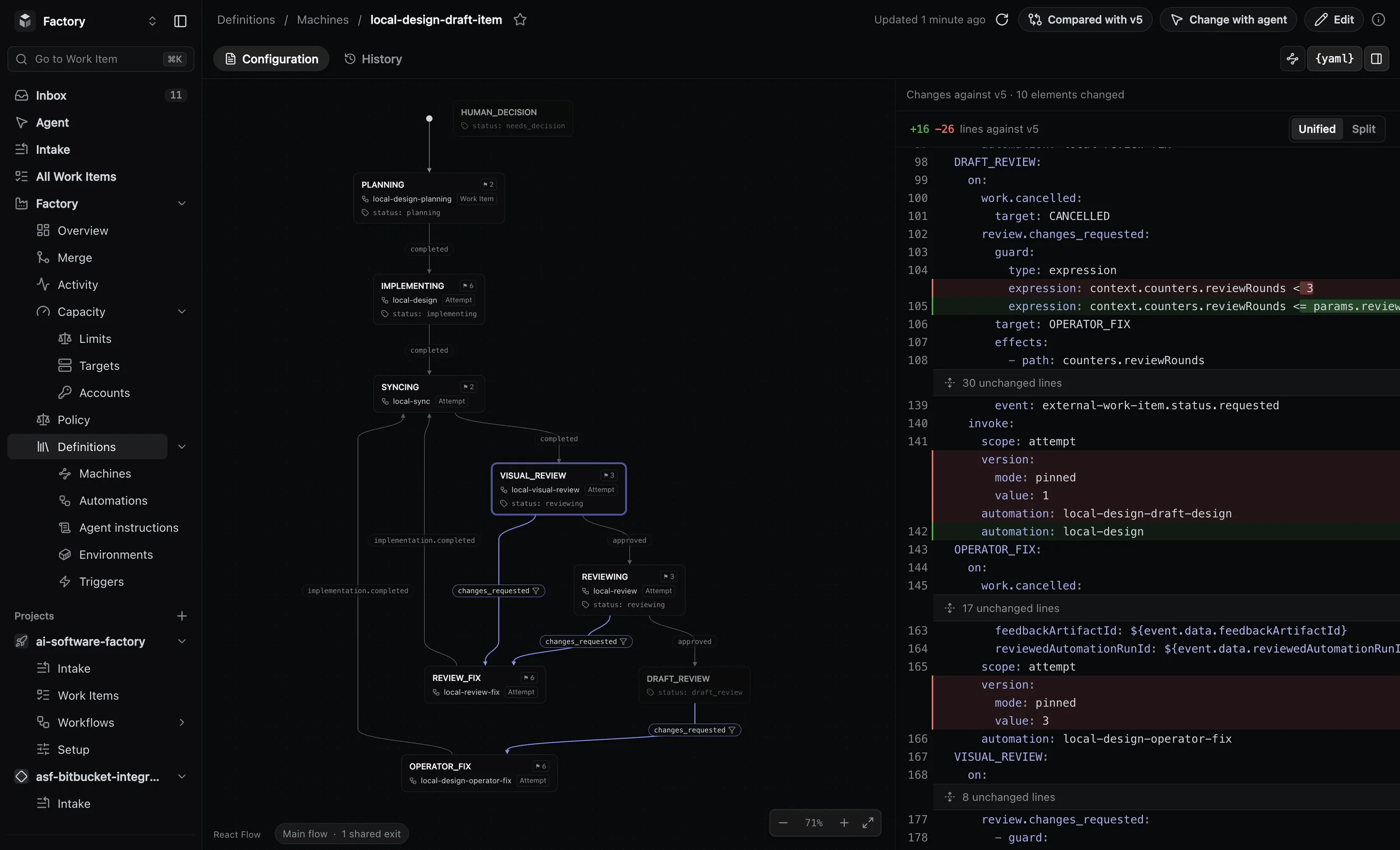
A workflow is a graph: the states work passes through and the transitions between them. Work goes from planning through building and review to merge, and back where a review asks for fixes.
- Work moves only on named events: a plan finished, a review approved, a merge refused.
- Rework and replanning are transitions too, and each loop has a cap.
- Decision states mark where a person decides, and the work waits there.
Edit the workflow in the browser, or ask the built-in agent to make the change for you.
2.2 Steps
Each step gets exactly what its job needs
A step is one job in the workflow: planning, building, reviewing. Each one is configured on its own:
- instructions for the agent at that step, versioned with the workflow;
- an environment: the image, the memory and the side services the work needs;
- the command that verifies the work before it moves on;
- limits: time per step, retries, and the task’s budget.
2.3 Ready workflows
Start from a workflow we already run
Pick the ready workflow closest to how your team works, then change what you do differently. It is a starting point, not a template you have to adopt.
UI design
From brief to merged screen, with a draft review and a final review by a person.
See the workflow → 02Feature delivery
A tracker issue planned, built, reviewed and merged.
See the workflow → 03Pull request review
A review on any pull request, posted on the pull request.
See the workflow →Broken build repair
A broken build on main gets a repair, closed when the build is green again.
See the workflow → 05Incident investigation
An alert becomes an investigation report, with no code change.
See the workflow → 06Scheduled upkeep
Dependency bumps and routine chores on a calendar.
See the workflow →2.4 Versions
Change the process like code
Every change to a workflow or to a project’s rules is a new version with a note. Compare any two versions before one goes live.
- A change to the rules is previewed on the last seven days of work: what would have been taken, dropped or routed elsewhere.
- Work in flight stays on the version it started with.
- Rolling back is activating the previous version.
Changes are marked on the performance charts, so you can see whether they helped.
2.5 Ship
Every change is tested on the main it will join
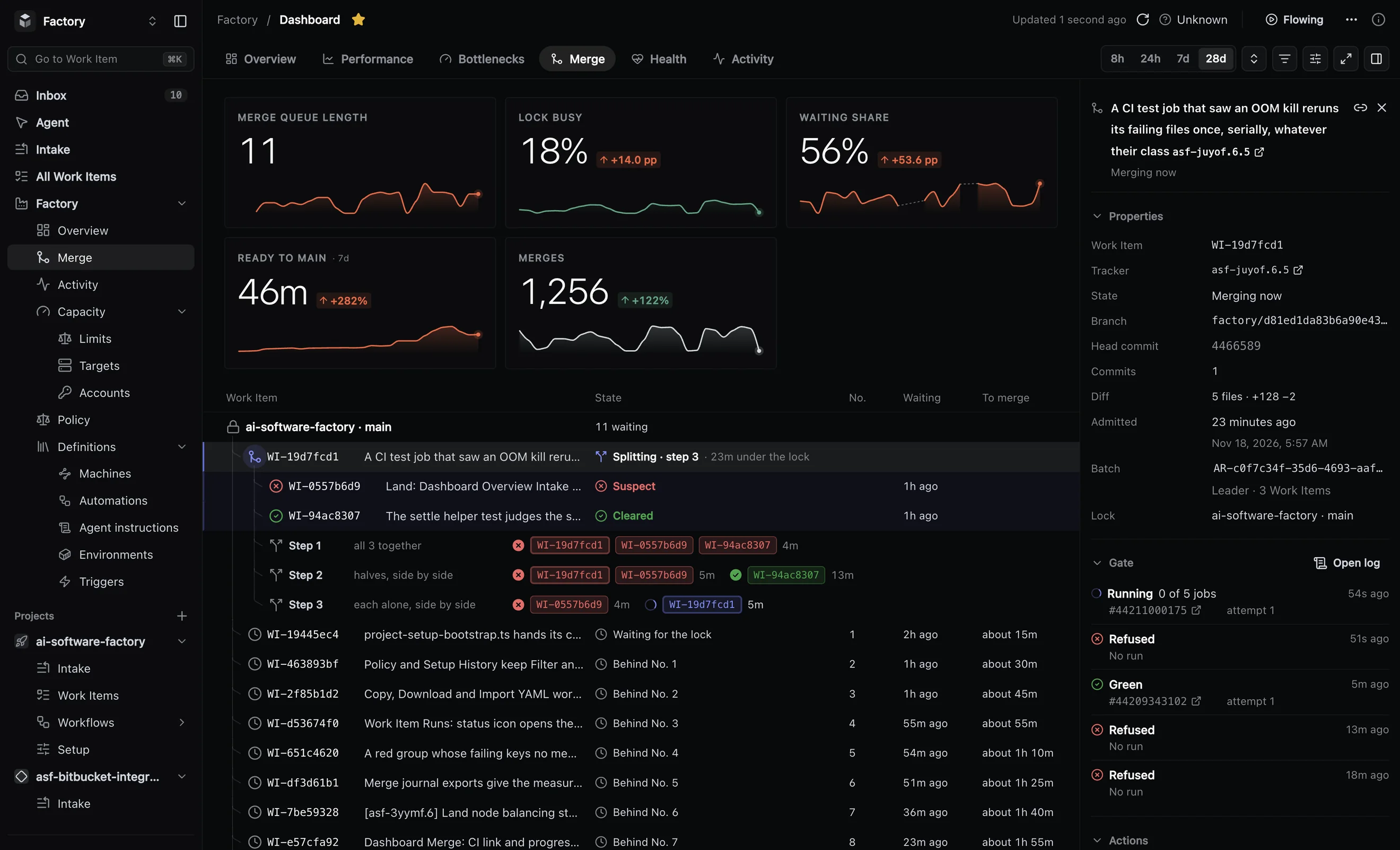
Agents keep many changes open at once, and each was tested against main as it was when the agent started. Two changes that pass on their own can still break main together. The merge queue closes that gap:
- each change is tested on the exact main it will join, before main moves;
- up to eight changes are verified together, and main moves once;
- a failing batch is split and its parts checked again, so one bad change does not hold the rest;
- your CI’s required checks must pass on the exact commit that merges;
- you can merge one change next, or alone;
- merges hold for a release freeze, with a reason and an end time.
Nothing merges past a red check.