Your engineering process, run by coding agents.
Agents take work from your tracker, CI and alerts and do it the way your team works. People step in only where it matters. Every step is measured, so the process keeps getting better.
- Linear
- Jira
- GitHub
- Bitbucket
- GitHub Actions
- Claude Code
- Codex
- Slack
Works with the tools your team already uses
Writing the code is the easy part.
The hard part is everything around it:
- which work to take
- how to check it
- who decides
- when to stop
- what it may cost
That is your process. Today it lives in people’s heads. The factory writes it down and runs it.
Your process, not ours
Encode how your team already plans, builds, reviews and ships. Change it whenever you like, one version at a time.
People where it matters
Agents stop and ask, with the evidence and a recommendation. Everywhere else the work moves on its own.
Better every week
Every change to the process is recorded next to the numbers. Keep what helps, roll back what doesn’t.
● Questions
Questions engineering leaders ask
What the people who answer for delivery ask first, answered by what the product does today. Open a question for the detail.
Every agent run records what it cost, and the dashboard adds it up per task, per project and per merged change.
Each task has a budget and each project a ceiling; at the cap the next agent turn does not start, and a person decides what happens next.
Cheap checks run often and expensive ones once, a merge batch is verified together, review and repair rounds are capped, and a person is asked only where your process needs one.
Each kind of work takes the same steps, checks and caps every time, and the dashboard shows cycle time at p50 and p90, so you see how predictable it is instead of being promised it.
Every event and everything a run produced is stored and cannot be changed once published; roles and project access decide who sees it, on the web, the API and MCP alike.
The dashboard shows where work is and where it waits, and any task opens down to the transcript of each agent session.
Each team gets its own process, budgets and access, while the merge queue, required checks and caps on load hold for all of them.
● The methodology in practice
How we ship our own screens with agents
This is our own UI design workflow, as the factory runs it today. Agents draft, check and fix. People review twice: a draft review of the idea, a final review of the finished screen.
See the workflows →Who works at each step
- Agent works
- Check passes
- Sent back
- You decide
The brief names the screen, its states, the components to reuse and what “done” looks like. A check refuses an incomplete brief before any agent starts.
Screens are built as live components in Storybook. Every state renders, and errors, overflow and accessibility problems that main doesn’t have are caught automatically.
A reviewer agent compares screenshots of every state with the brief and sends fixes back, at most twice, before a person is asked.
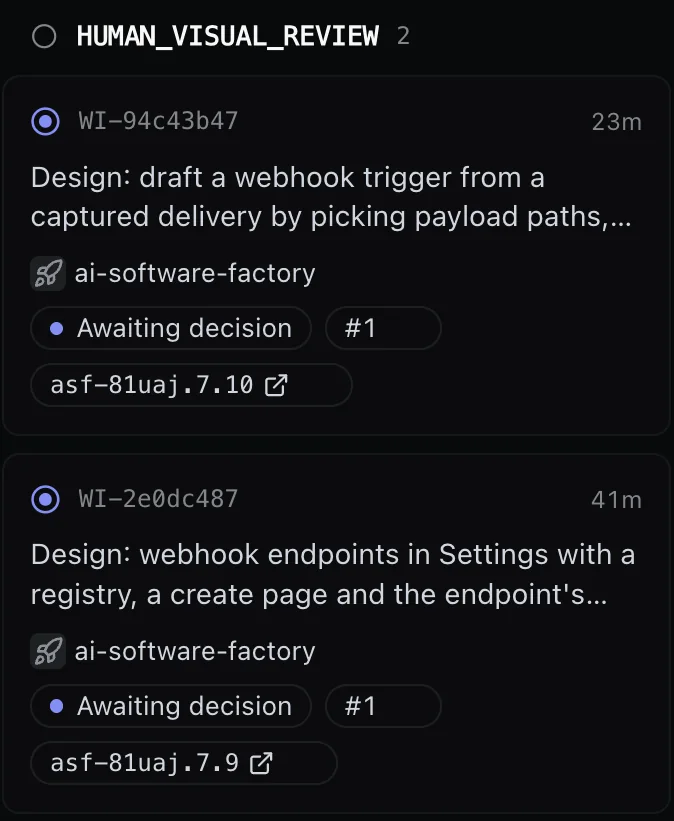
You get a preview link to the live screens and a one-page review sheet. Approve, or leave remarks for the agent. After the round limit, the factory asks you how to go on.
The screen is wired into the product and covered by tests. The reviewer checks it again, then you look at the finished screen.
An agent reviews the code, the full test suite runs, and the change merges through the queue with its help pages updated.
Small interface fixes ship in batches: each merges on its own, and you review the whole area once.
1.0 Intake
Issues, pull requests and alerts start the work
Issues from your tracker, pull requests waiting for review, a broken build on main, an alert, a schedule, any webhook. Each source has its own rules for what gets picked up and which process it goes to.
Learn more →2.0 Process
Agents follow your process. Ask one to change it.
Everything that makes the process yours is set per team, and an agent can make the change for you. Ask in chat, or press Change with agent on the workflow: the change starts as a draft version that you check before it goes live, and can roll back.
Learn more →- Sources and routes
- Steps and states
- The agent and instructions per step
- Checks
- Review rounds
- Budgets and limits
- Where a person decides
- The merge policy
- DraftAsk an agent, or edit the workflow yourself.
- PreviewA change to the rules is tried on last week’s work first.
- PublishNew work starts on it; running work keeps its version.
- Roll backActivate the previous version.
3.0 Reviews & decisions
Every change is checked before anyone is asked
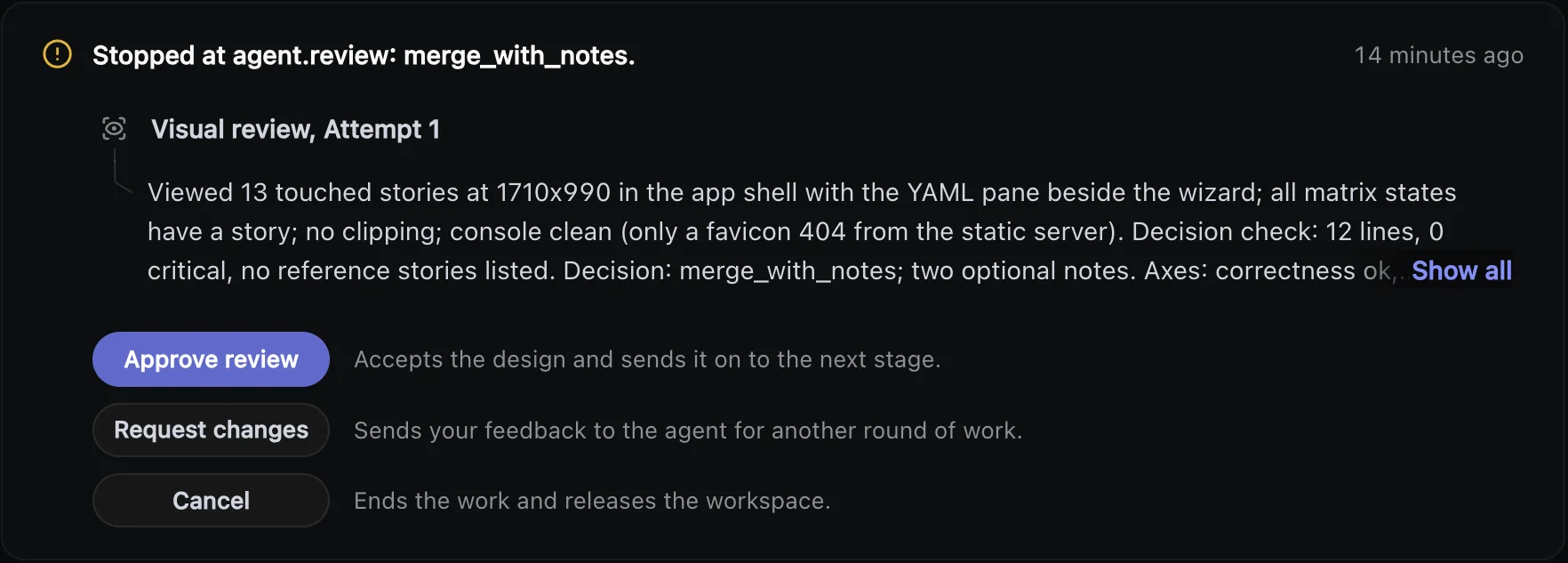
Every change passes the checks your team defines: automated pre-checks, an agent’s review, a visual review for interface work, and a person where you require one. When the work needs a call, the factory stops and asks, with the evidence and its recommendation.
Learn more →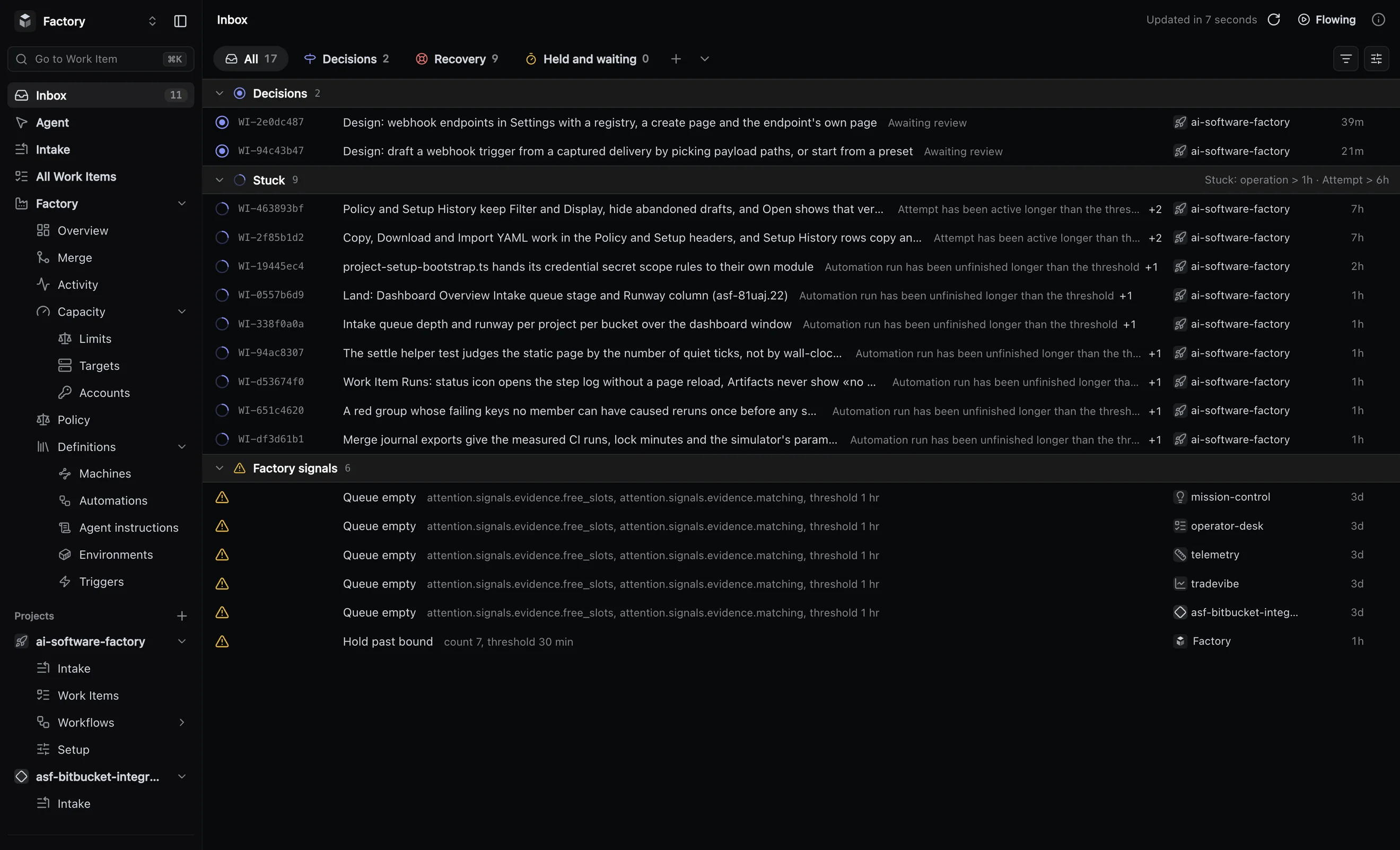
4.0 Control
Agents stop at the limits you set
Budgets per task and per project, caps on retries and on how many agents run at once. Roles and project access for every person and every agent. Agent sandboxes can run on your own machines. Nothing goes past a limit without a person saying yes.
Learn more →5.0 Insights
Find where work waits, and fix that first
Measure the line, find where it slows, change the process and see what the change did. Each change to the process is marked on the charts, and with our weekly review you decide whether to keep it or roll it back. What agents find along the way, and review remarks that do not block, become follow-up work.
Learn more →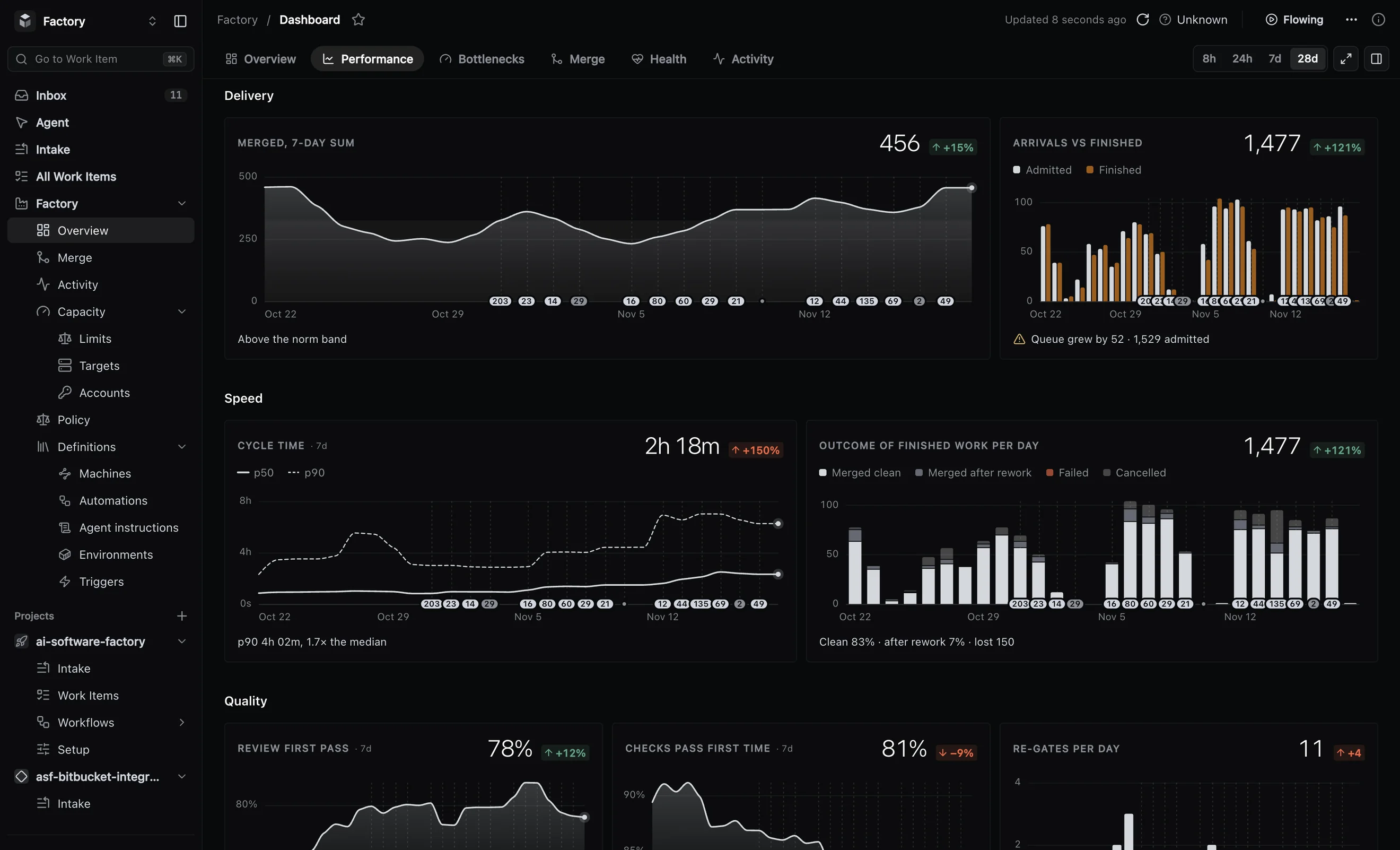
6.0 Agents & MCP
Use any coding agent. Steer the work from chat.
Claude Code, Codex, OpenCode or Pi: your process works with the agent you choose. Ask the built-in agent why something stopped, or connect your own agent over MCP and run the factory with your permissions.
Learn more →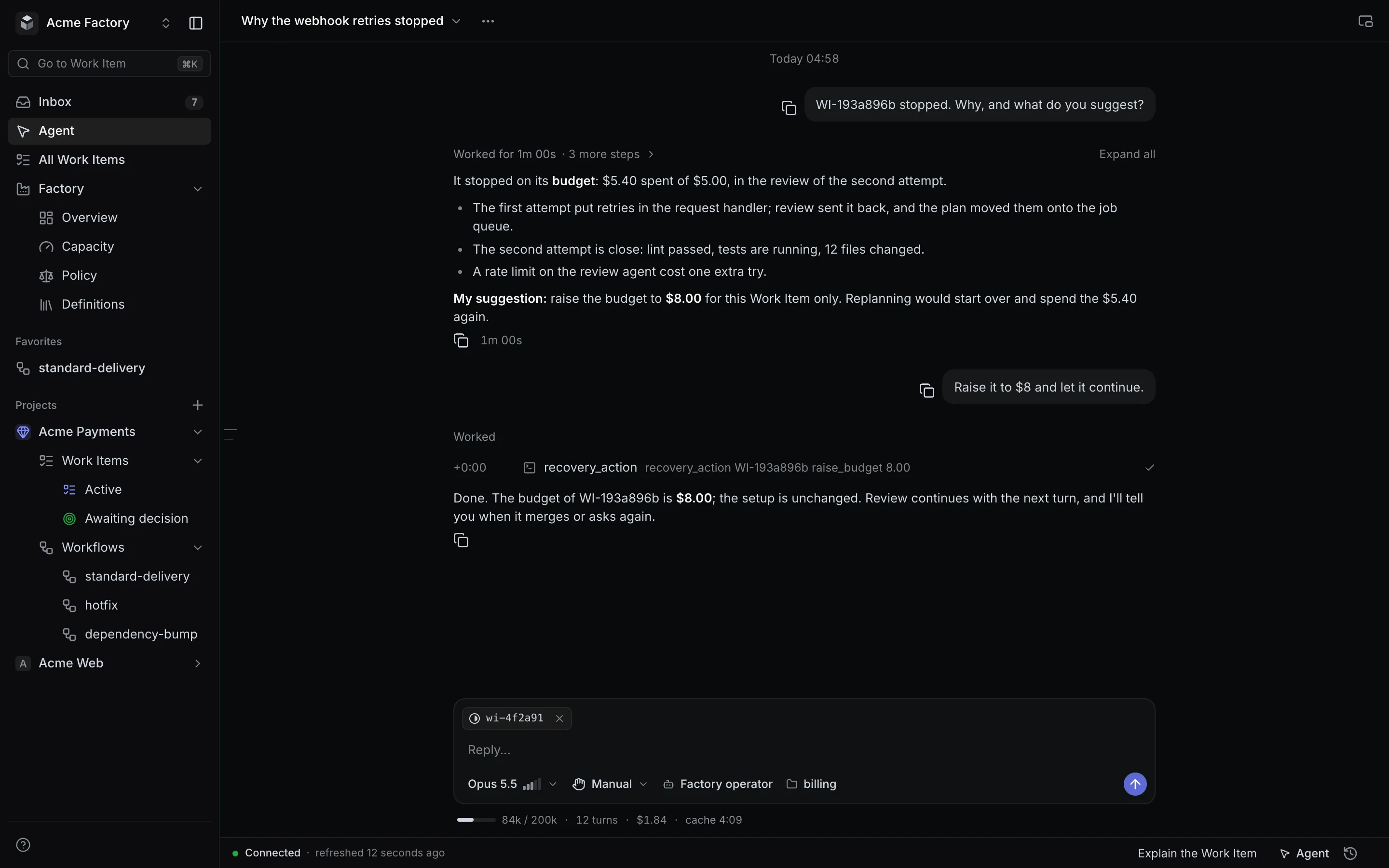
● Proof
The factory builds itself. These are its numbers.
We build this product on itself, by the same methodology we bring to your team.
- 1,753
- changes merged in six weeks
- 87%
- merged with no person stepping in
- 1.0M
- lines of TypeScript, about 40% of them tests
- 10,116
- files in the repository
Our own numbers on our own products: 1,726 of the changes are on the factory’s own code. “No person stepping in” means no human decision, review verdict, recovery or hold on that change. This is not a forecast for your team.
● Changelog
Shipping every week
The factory ships the factory. A few of the latest releases.
- Every source in one queue
Trackers, pull requests, broken builds on main, schedules and webhooks feed one queue, with priorities between them.
- Calendar schedules
Run a workflow on a calendar rule. Missed slots are recorded, not lost.
- Review any pull request
The factory reviews pull requests from people and other tools and posts the review on the PR.
- Decisions that explain themselves
A stopped task says why it stopped and what each answer will do with the work.
● How we work
We bring the methodology. You keep your process.
We set the factory up with your team, on your tools, starting small. Autonomy grows only as fast as the numbers allow.
How we work →Map
We map how your team works today and pick the first workflow: usually the chores that cost time and carry little risk.
Pilot
The factory runs it on one repository with your tools and your checks. You see every change, its review and its cost.
Expand
More workflows, more repositories and more autonomy, as the numbers earn it.
Tracker issues
Issues in your tracker become planned, built, reviewed and merged changes. Label an issue, match it with a filter, or assign it to the agent, right in the tracker your team already uses.
How it works
- Linear
- Assign an issue to the agent or let a label pick it up; changes arrive by webhook.
- Jira Cloud
- Connects over OAuth, and Rank and priorities set the order.
- What is taken
- A label or a filter you set decides which issues the agents pick up.
- Status
- The issue’s status follows the work, mapped to your own statuses.
- Other trackers
- GitHub Issues, Azure DevOps Boards and Beads.
Pull requests and broken builds
Two kinds of work your team already has start on their own: pull requests waiting for a first read, and a broken build on main. Each ends in a result the team sees where it already looks.
How it works
- Pull request
- One from a person or another tool gets a review posted on it.
- The review
- Review comments and a check run on the pull request.
- Branch moved
- If the branch moves during the review, the review is refused instead of posted.
- Broken build
- When the build on main breaks, the factory opens a repair task on its own.
- Green again
- A green run on main closes the repair task.
Alerts, webhooks and API
Any system that can send a webhook or call an API can start work. An alert from your monitoring becomes an investigation report, and a call from your own tooling becomes a new task.
How it works
- Webhook
- Any system can post to it, and a trigger you define decides which deliveries become work.
- Each delivery
- Its signature is verified, duplicates are dropped and it is logged.
- Dry run
- See what a delivery would start before you switch it on.
- Alert
- An agent investigates and writes a report; it changes no code.
- API
- One call starts a task, and with an idempotency key a retried call never starts it twice.
- Presets
- Ready presets for Sentry, Datadog, PagerDuty and Grafana.
Routing rules and schedules
Each source has its own rules: what the agents pick up, how it ranks against other sources and which workflow it goes to. Every item goes to exactly one workflow.
How it works
- Priorities
- Rank sources against each other, so work is taken in the order you set.
- Try a route
- See where a sample item would go and why, before the rule goes live.
- Preview
- A change to the rules is shown on the last seven days of work: what would be taken, dropped or sent elsewhere.
- Counters
- See how many items each rule and each workflow took.
- Pause
- Quiet any source when you need it.
Schedules
A calendar rule starts one run per slot, such as every weekday at nine. Runs never overlap, and a missed slot is recorded, not lost.
More on Intake →Workflow graph
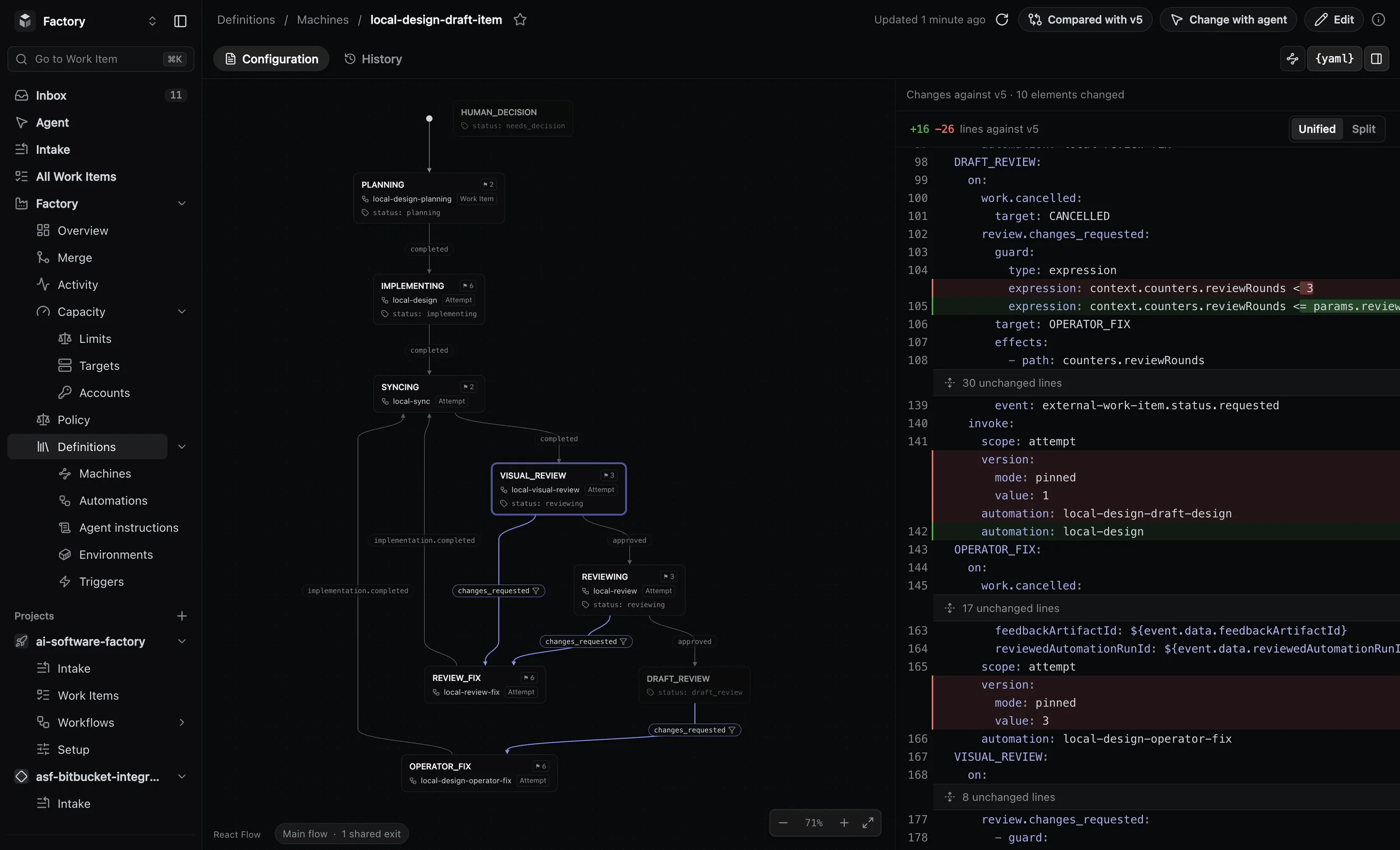
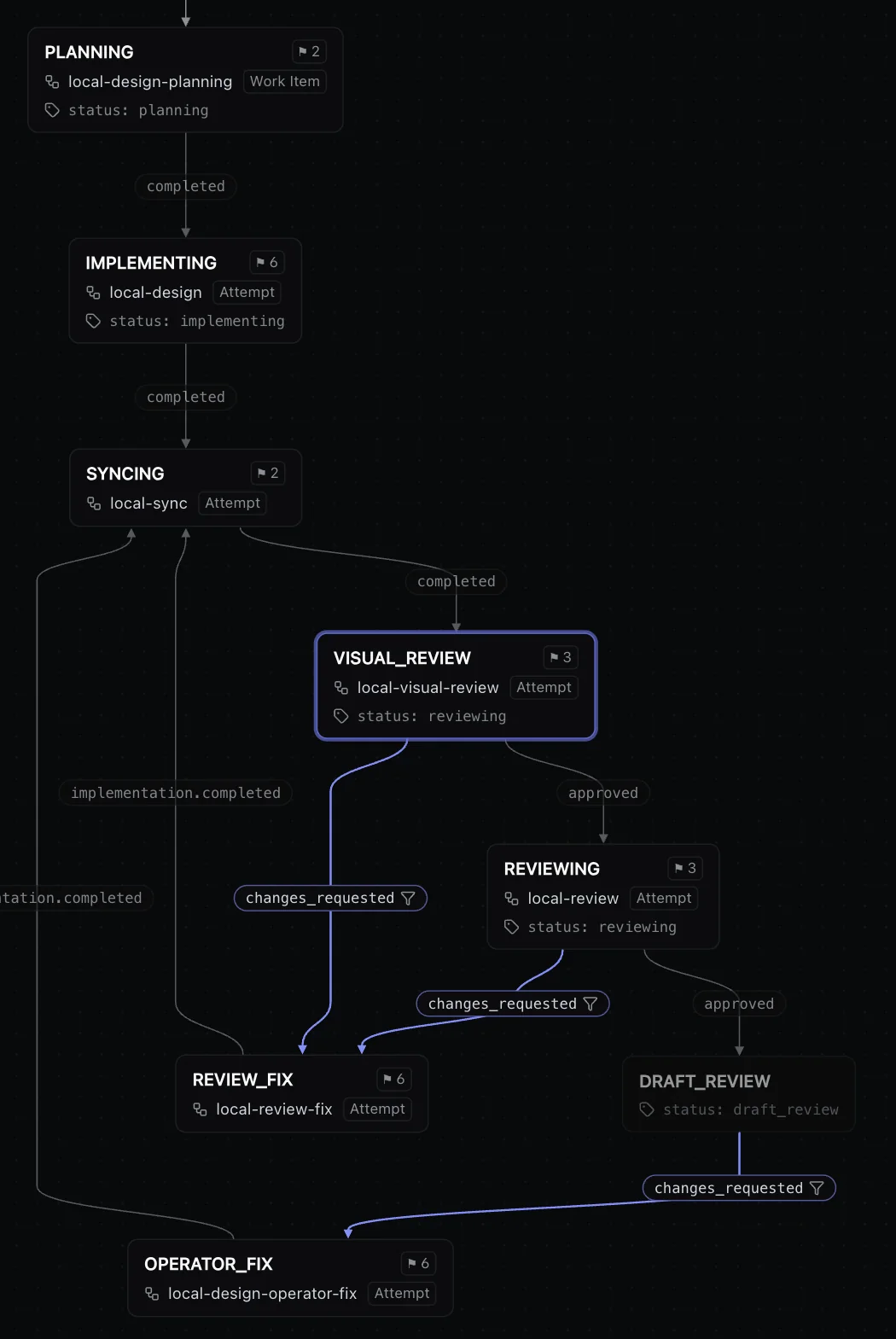
Your process as a graph anyone on the team can read: the states work passes through and the moves between them. Rework loops and the points where a person decides are drawn on it too.
How it works
- States
- Planning, implementing, reviewing, review fixes, merging, done, and any your team adds.
- Events
- Work moves only on named events: a plan finished, a review approved, changes requested.
- Loops
- Rework and replanning are transitions too, and each loop has a cap.
- Decisions
- Where a person decides, the work waits for an answer.
- Editing
- Change it in the web app, or from any agent through MCP.
Versions and preview
Change the process like code: every change is a new version with a note, compared with the last one before it goes live. Work already running stays on the version it started with.
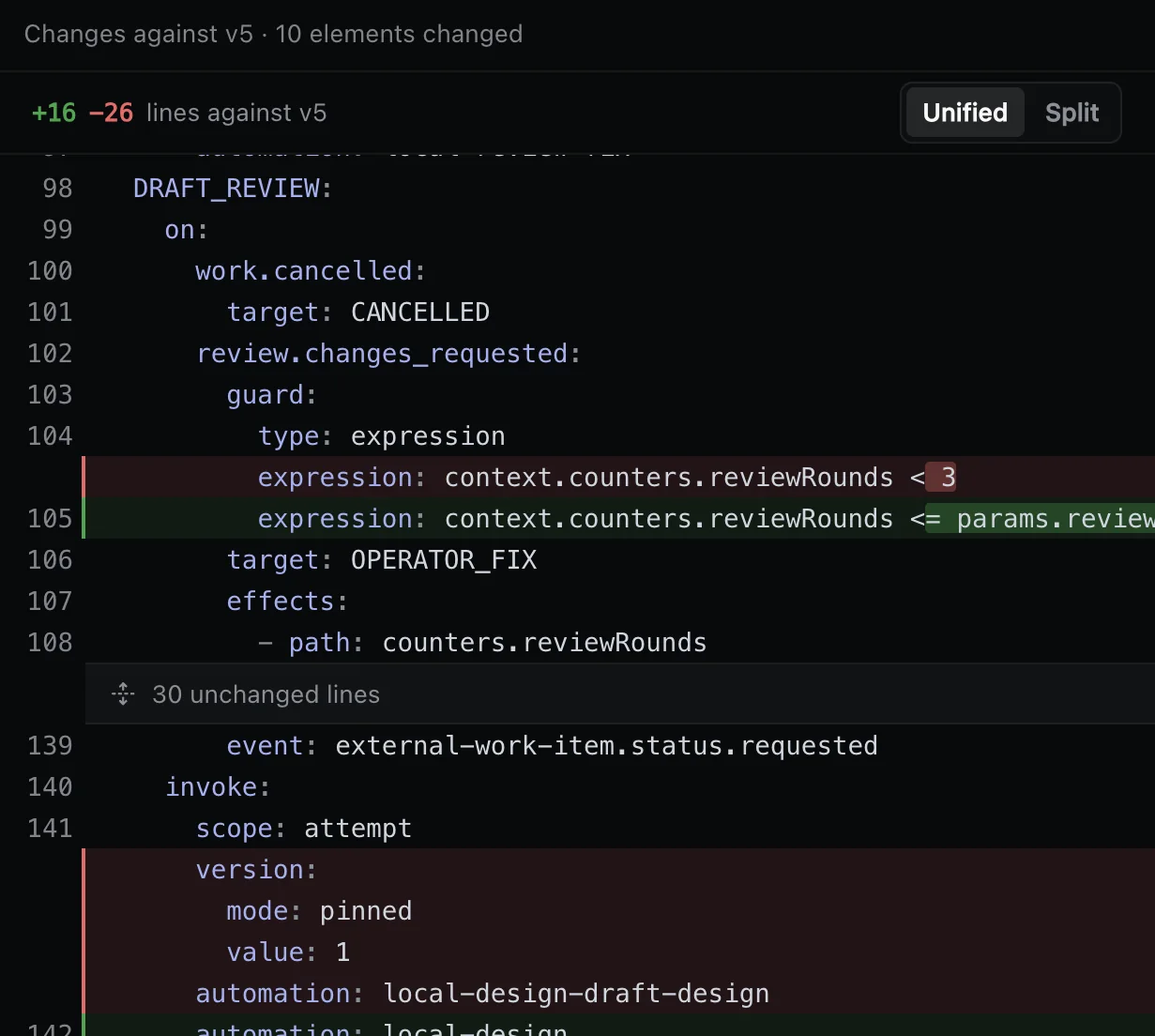
How it works
- Draft
- Every change starts as a draft and is validated before it can go live.
- Compare
- See any two versions line by line.
- Preview
- A change to intake or routing is shown on the last seven days of work first.
- In flight
- Running work stays on the version it started with.
- Roll back
- Activate the previous version.
After it goes live
Each change is marked on the performance charts, so you can read the numbers on either side of it and decide whether it helped.
More on Process →Merge queue
Every change is tested on the exact main it will join, before main moves. Changes are verified in batches, and a failing batch is split so one bad change does not hold the rest.
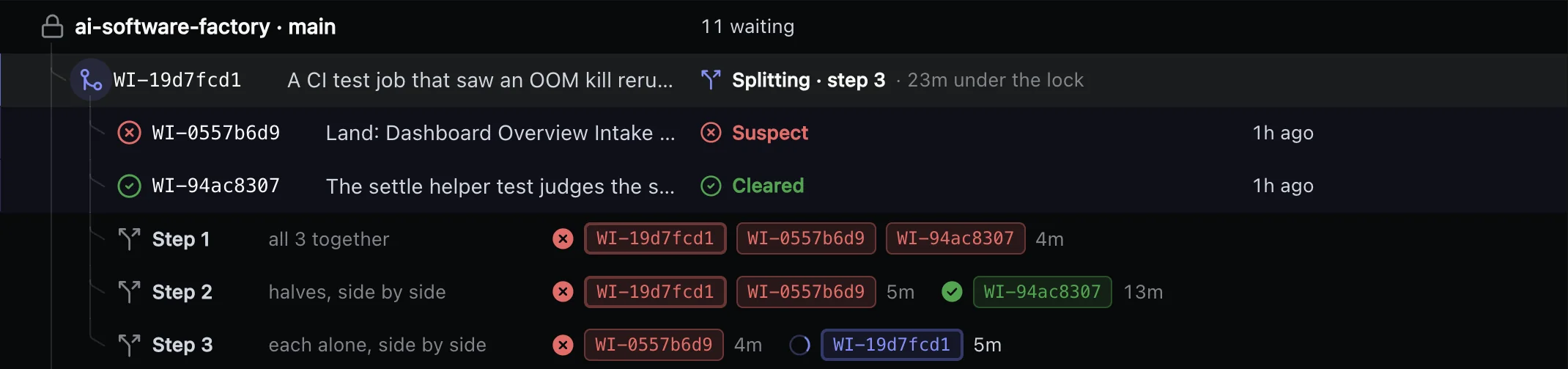
How it works
- Exact base
- Each change is tested on the main it will join, before main moves.
- Batches
- Up to eight changes are verified together, and main moves once.
- Split
- A failing batch is split and its parts checked again.
- Required checks
- Your CI’s required checks must pass on the exact commit that merges.
- Your controls
- Merge one change next or alone, and hold merges for a release freeze with a reason and an end time.
Required checks
Your CI decides what merges. Nothing merges past a red required check. The factory reads the verdict of your required jobs on the exact commit that merges, not on an older one.
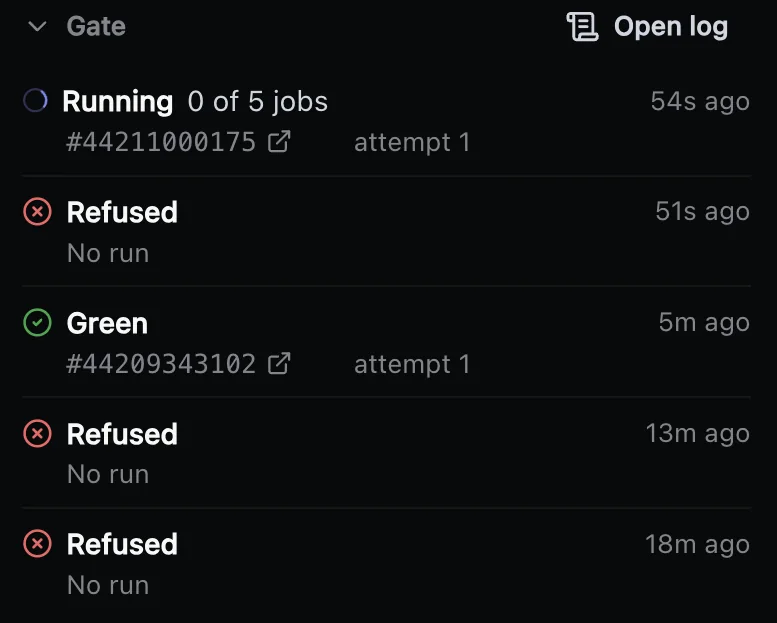
How it works
- Required jobs
- Your required CI jobs judge every merge.
- Exact commit
- A green run counts only for the commit that merges.
- Stays red
- The factory stops and asks a person, with the evidence.
- Record
- Each verdict is stored as a CI merge judgement.
- Your CI
- GitHub Actions, Bitbucket Pipelines, GitLab CI, CircleCI and Azure Pipelines.
Agent review
An agent reviews the code of a change and sends what must be fixed back to the coding agent. A person is asked only where your process requires one, or when the rounds run out.
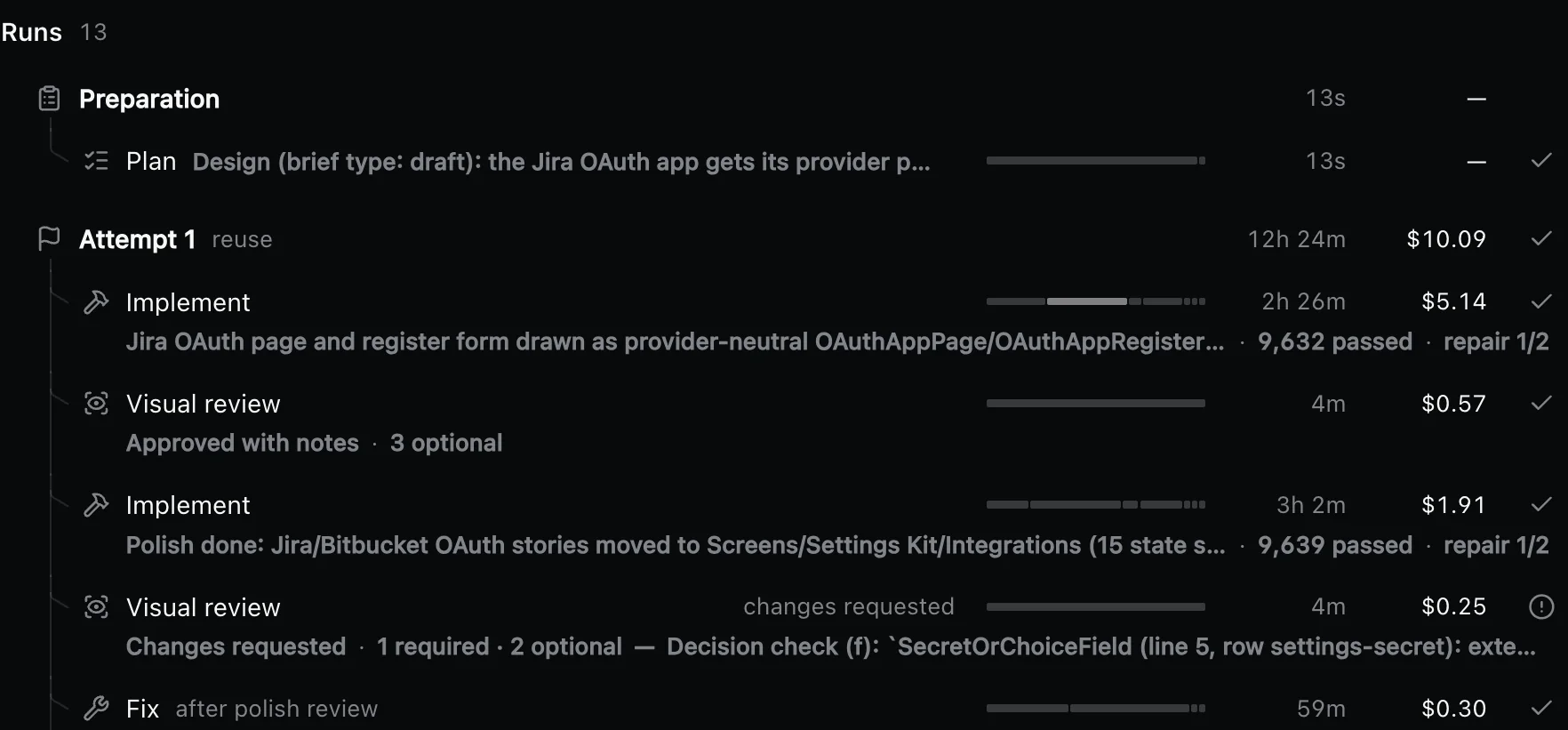
How it works
- Blocking list
- A change goes back only for a problem on the list your team agreed.
- Follow-up work
- Other findings are filed as separate tasks, and the change moves on.
- Rounds
- Fix rounds are capped; at the cap the factory asks a person how to go on.
- Verdict
- Each review leaves its verdict and a stored review you can open later.
- Pull requests
- Pull requests your people open can get a review too, as comments and a check run.
Visual review
For interface work, an agent judges screenshots of the screens against the brief before a person is asked. Automated story checks run first, and what does not match goes back to the designer agent.
How it works
- Story checks
- Every story must render; console errors, overflowing elements and serious accessibility violations that main lacks are caught.
- Against the brief
- The reviewer agent compares the screenshots with the brief written before work started.
- Fix rounds
- Up to two rounds go back to the designer agent before a person is asked.
- Draft review
- A Storybook preview link for each version, with a one-page review sheet.
Decision requests
When the work needs a call, the factory stops and asks, and the request explains itself. It says why the work stopped, shows the evidence and recommends an answer.
What it carries
- When it stops
- The budget runs out, an agent asks a question, checks stay red, the work does not converge, or your merge rules need a person.
- Evidence
- The runs, checks and reviews behind the stop.
- Each answer
- Says what it will do to the work before you pick it.
- Recommendation
- The answer the factory recommends.
- While it waits
- The work is kept, and your answer continues it where it stopped.
The answers
Approve, request changes, merge, retry, continue, replan, cancel or raise the budget.
More on Reviews & decisions →Answers on the web or in Slack
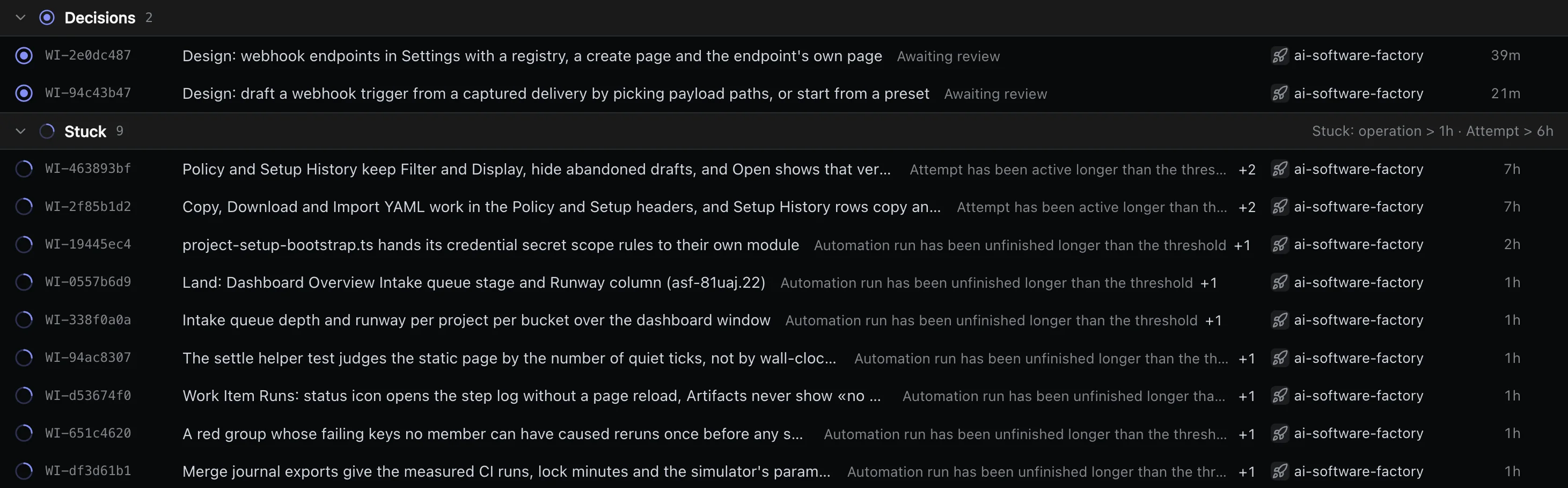
Requests come to your people, not the other way round. Everything waiting for a person sits in one inbox on the web, and Slack tells the people who decide.
How it works
- Inbox
- One list in the web app of everything waiting for a person.
- Task page
- Answer on the task itself, next to its timeline, its checks and the stored records of every run.
- Slack
- The request arrives with its answers, and the answer you give there goes back to the task.
- Who answers
- Roles and project access decide who may answer.
- Same work
- Wherever you answer, the work continues where it stopped.
Budgets
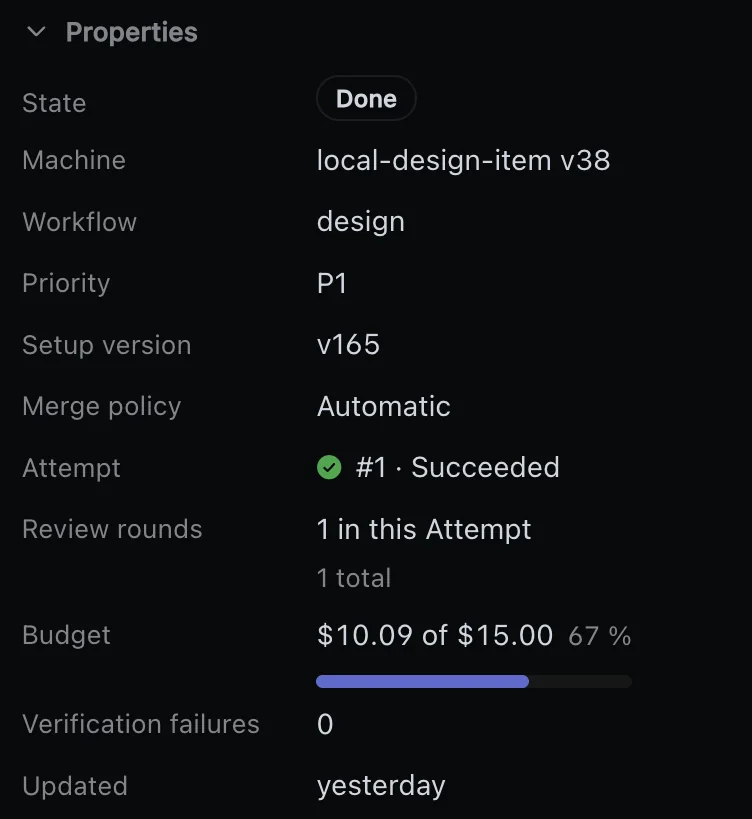
Every task has a budget and every project a ceiling, and spending stops where you set it. At the cap the work is kept, and a person decides what happens next.
How it works
- Per task
- Each task has its own budget, shown as spent against the cap.
- Per project
- Each project has a ceiling of its own.
- Warning
- You are warned at 80% of the budget.
- At the cap
- The next agent turn does not start, and the task asks a person to raise the budget, replan or cancel.
- Work kept
- Raising the budget continues the same run where it stopped.
Limits on retries and load
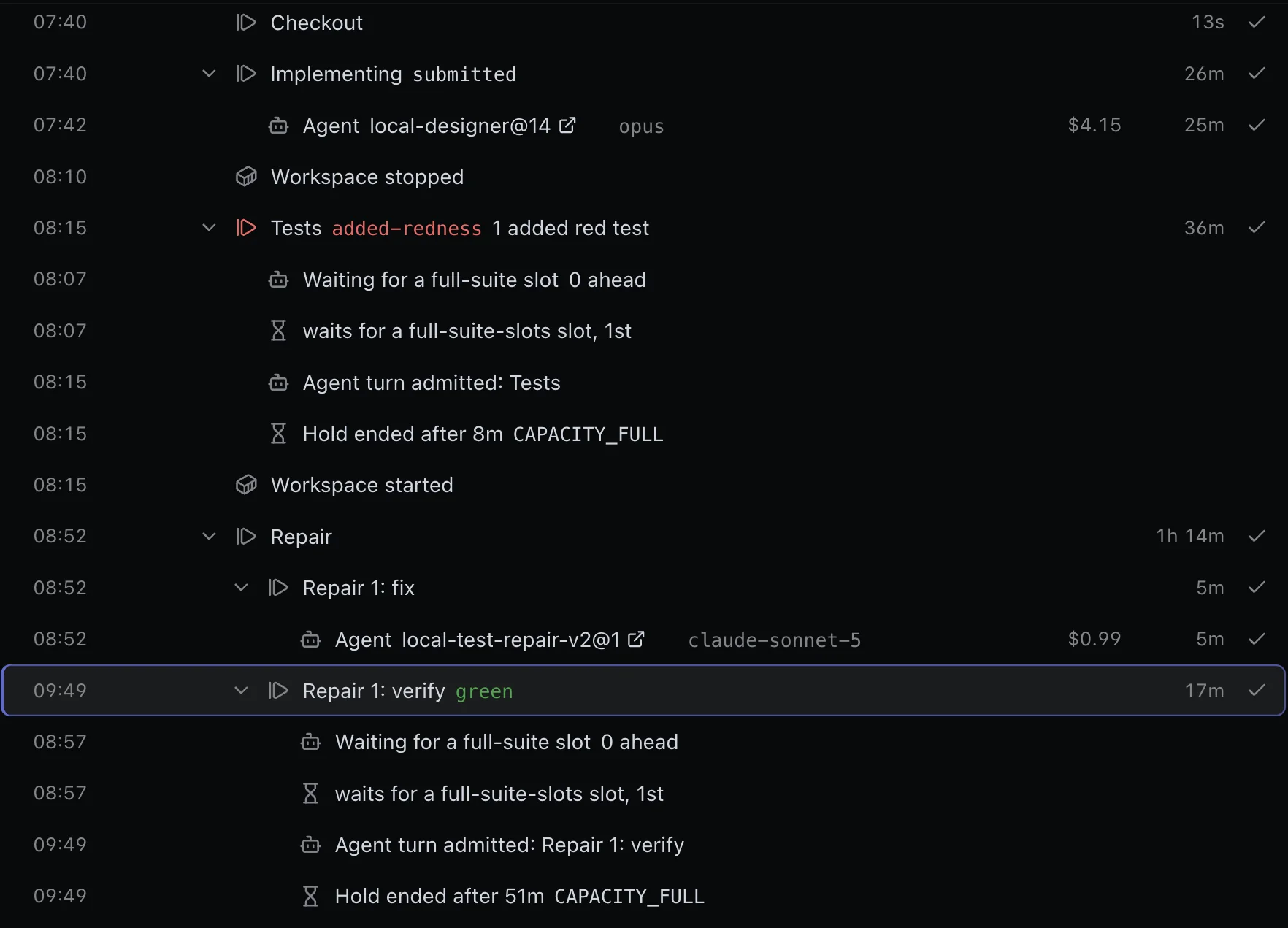
Every repeat has a cap and every step a time limit, so nothing loops forever. Caps on how much runs at once keep a busy day from swamping your machines or your CI.
How it works
- Retries
- New plans, review fix rounds, repair rounds, refused merges, automatic reruns and retries per step are each capped.
- Time
- Each step and each sandbox has a time limit.
- At a cap
- The task stops and asks a person, with the evidence, instead of trying again.
- Load
- Cap the tasks in flight, the agents running, the full test suites, the merge queue depth and the workspaces per machine.
- Waiting
- When a cap is full, new work waits for a free slot, and the wait shows on its timeline.
Sandboxes you choose
Each task runs in its own sandbox, on machines you choose. Run agents in Docker on your own machines, or in cloud sandboxes with no machines of your own.
How it works
- Docker
- A Docker host in your network, local or reached over SSH.
- E2B
- Cloud sandboxes, with no machines of your own to run.
- Also
- Kubernetes, AWS, Cloudflare and Daytona.
- Environment
- Each step names its image, its memory, the command that verifies the work and the side services it needs.
- Per machine
- Cap how many workspaces each machine runs at once.
- While waiting
- A task waiting for a person keeps its workspace paused, so no work is lost.
Roles, access and audit trail
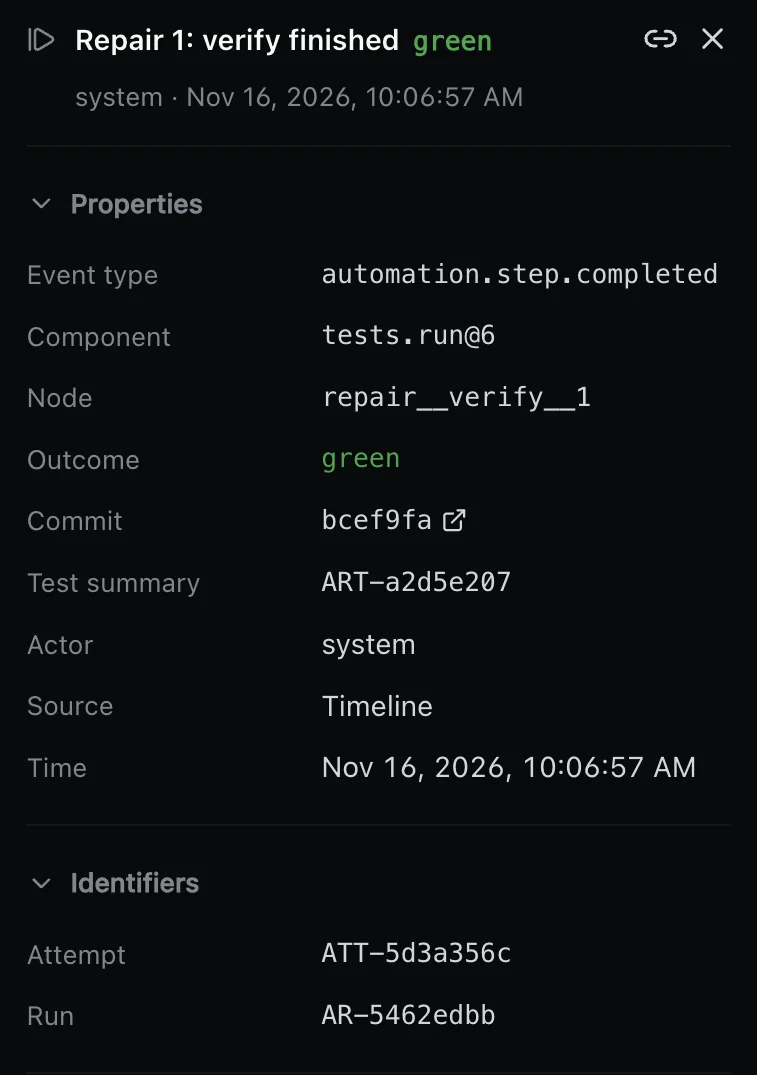
People and agents meet the same roles and the same project access, whether they come through the web, the API or MCP. Every task keeps a timeline of every event, and what a run stored cannot be changed once published.
How it works
- Roles
- Viewer, Operator, Organization admin and Platform admin.
- Projects
- Access to a project is denied until someone grants it.
- Sign-in
- Single sign-on through Google, GitHub, GitLab, any OIDC provider or Cloudflare Access.
- Keys
- Personal API keys are hashed, scoped and expiring; agents connect over OAuth, with consent and revocation.
- Audit
- Every event of a task is on its timeline, and integration installs, revocations and disconnects are audited.
Dashboard
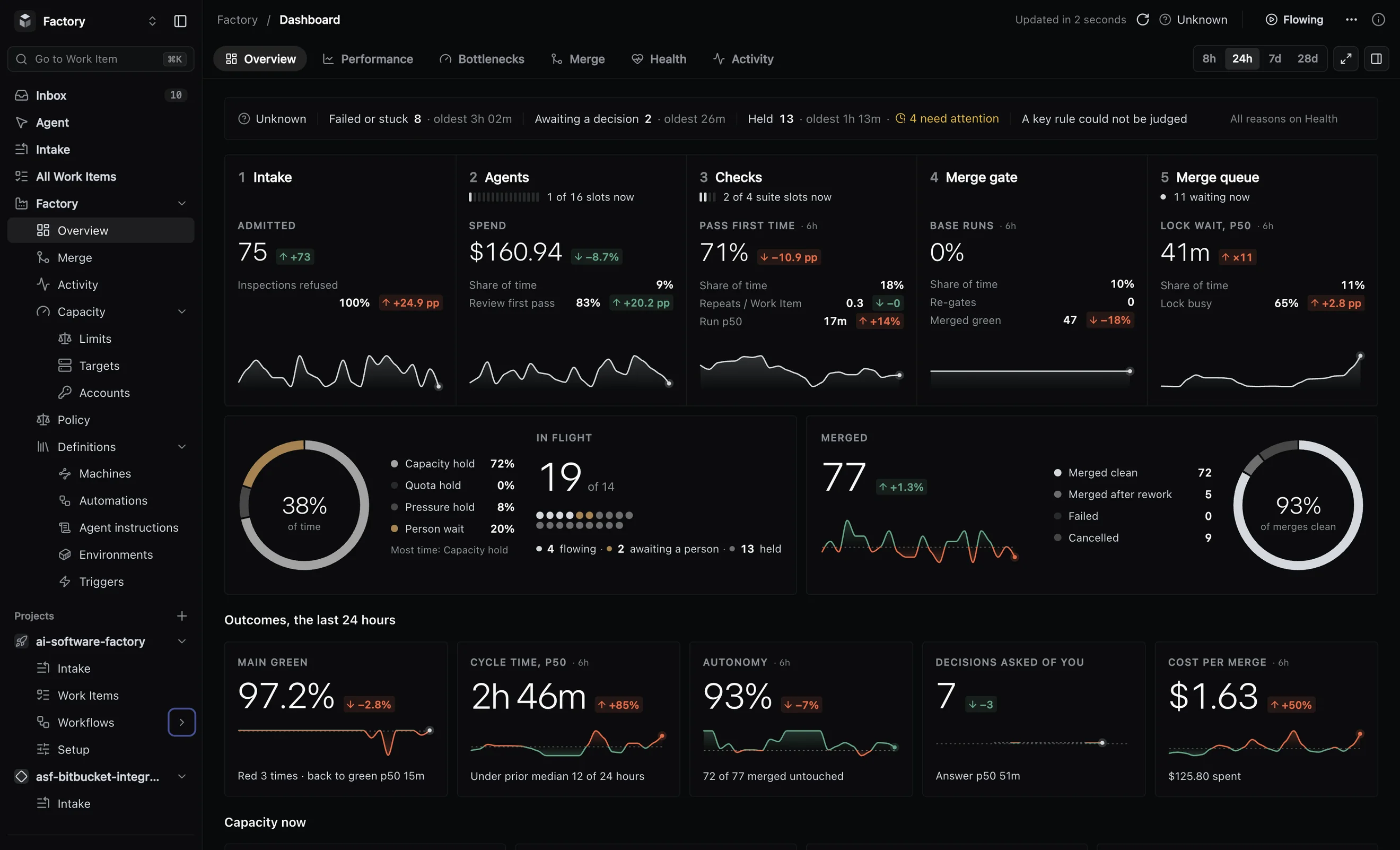
One dashboard for all the work: what merged, how long it took, where it waits and what it cost. Each view answers one question, from what is moving now to what changed in your process.

Six views
- Overview
- Health, and the work in flight by stage: intake, agents, checks, merge gate and merge queue.
- Performance
- Merged against your goal, cycle time at p50 and p90, review and checks passed first time.
- Bottlenecks
- Where the time goes.
- Merge and Health
- How changes get through the queue, which rules fired and how fresh each source is.
- Activity
- What changed in your process and when, next to the numbers.
Measures
Changes merged per week, cycle time, review passed first time, cost per merged change, main green share and how many decisions people were asked to make.
More on Insights →Bottlenecks
See where the time goes, so you know what to fix first. Queue depth shows how much work is flowing, held or waiting to merge, against the limit you set.
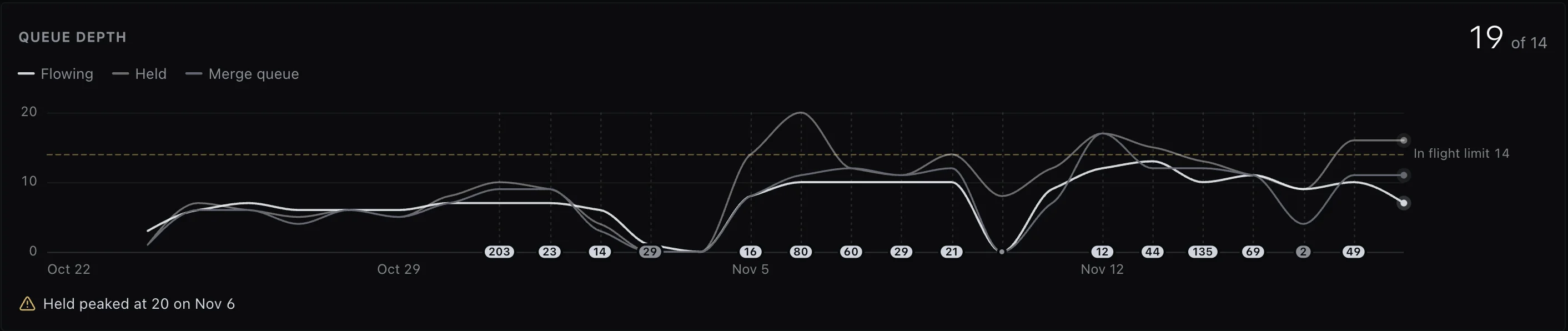
How it works
- Ready to main
- How long a ready change takes to reach main, at p50 and p90.
- Flow by stage
- Work in flight at intake, agents, checks, the merge gate and the merge queue.
- In and out
- Arrivals against completions show whether work comes in faster than it finishes.
- Age of open work
- How long the work still open has been waiting.
- Held too long
- Work held past its bound raises a flag in the Attention inbox.
Signals
When a number drifts, you hear about it. About 20 rules watch the numbers, and when one fires, a flag lands in one Attention inbox.
How it works
- What they watch
- A broken build on main, a person waiting too long, a throughput drop, cost drift, a noisy test file, a silent source.
- Thresholds
- Each rule has a threshold you set, such as 30 minutes for held work.
- Per project
- A rule can fire for one project, such as a queue left empty for an hour.
- One inbox
- Flags sit beside the decisions waiting for a person.
- Incidents
- The factory files its own failures and alerts you.
Work found along the way
What an agent notices outside its task is filed as separate work instead of being fixed silently. The change stays within its task, and what was found is kept as a record of its own.
How it works
- Findings
- Agents file problems outside their task as separate work.
- In the result
- Each run’s result lists what the agent found.
- Review remarks
- Reviewers block only on an agreed list; other remarks become follow-up work.
- Broken build
- A broken build on main becomes repair work.
- Alerts
- An alert becomes an investigation.
Coding agents
Claude Code, Codex, OpenCode or Pi runs each step of your workflow, and your process is not tied to any of them. Every run shows what it cost and what the agent did.
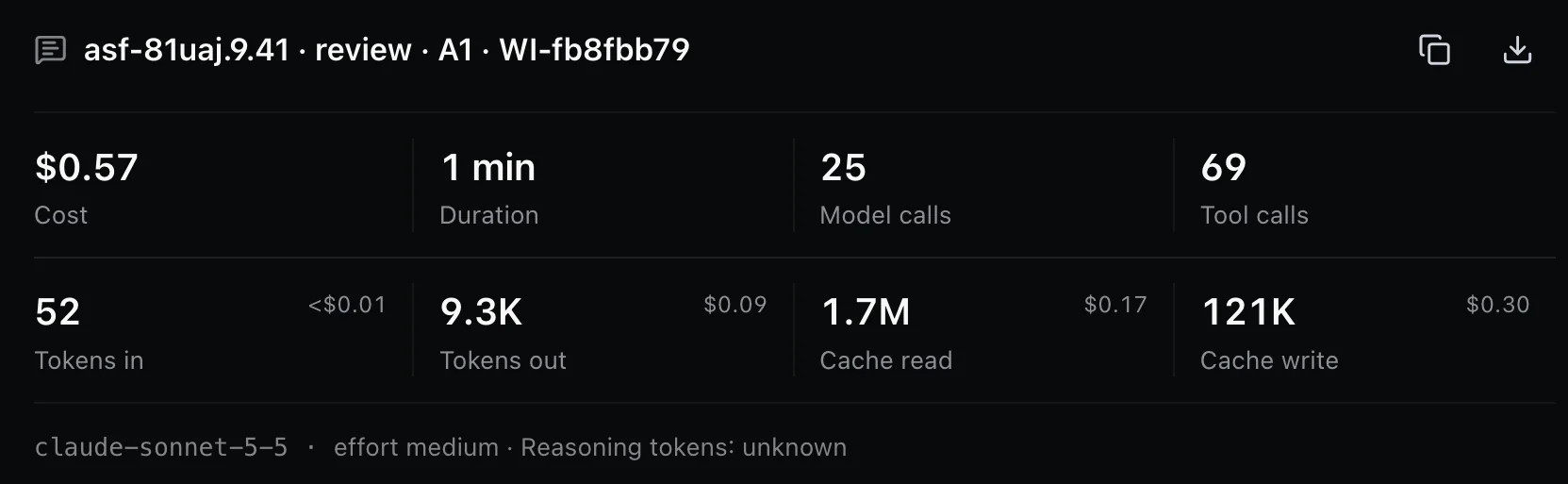
How it works
- Per step
- Each step names the agent that runs it: plan with one, write the code with another.
- Same process
- The steps, instructions, checks and limits stay the same whichever agent runs a step.
- Per run
- Cost, duration, model calls, tool calls and tokens, each with its cost.
- Transcript
- Every agent session is stored as a transcript you can read later.
Built-in agent chat
Ask the factory what is going on, in a chat that knows what you are looking at. It explains why work stopped, and in operator mode it can act on the answer, within what your role allows.
How it works
- Over any screen
- Press ⌘J on any page; the chat sees the task or the selection you have open.
- Guide
- Read-only: it answers questions about what you see and changes nothing.
- Operator
- Every tool your role allows, so it can act on what it finds.
- Secrets
- Secrets never pass through the chat.
MCP server
Run the factory from your own agent. MCP is the open protocol agents use to call tools. The factory’s MCP server offers a full set of tools, so Claude Code, Codex, Cursor or any MCP client can run the factory with your rights.
What it can do
- Configure
- Change workflows and rules, from a draft to a published version.
- Recover
- Find out why work stopped and recover it.
- Queue
- Watch the queue and set its limits.
- Sources
- Manage the sources work comes from.
- Access
- Clients connect over OAuth with your consent, and secrets never pass through MCP.
Transcripts and artifacts
Every run leaves records you can open later: what the agent did and what it produced. Nothing stored can be changed once published.
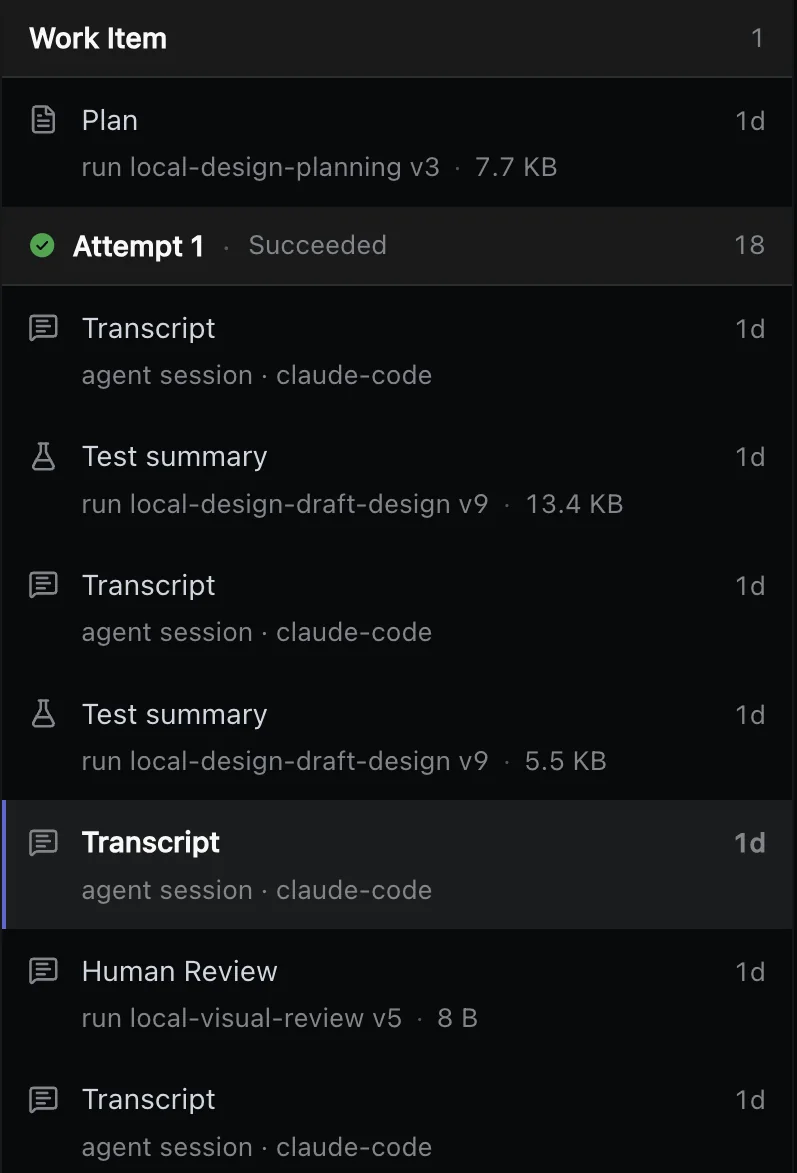
What is stored
- Transcript
- Each agent session, as a transcript.
- Results
- The plan, the review, test, build and diff summaries, and the agent’s result.
- Diagnosis
- A log bundle and a diagnostic snapshot.
- Merge
- The CI merge judgement behind each merge.
- Timeline
- Every event of the task, from arrival to merge or stop.
Where does the money go?
Every agent run records what it cost, and the cost adds up to the task, the project and each merged change. You see which work the money goes to while the work runs.
Where you see it
- Per run
- Cost, duration, model calls, tool calls and tokens of each agent session.
- Per task
- Spend against the task’s budget.
- Per project
- Spend against the project’s ceiling.
- Per merged change
- Cost per merged change on the dashboard, next to cycle time and review passed first time.
- Drift
- A rule watches cost and raises a flag in the Attention inbox when it drifts.
How do we stop runaway spend?
Spending stops where you set it: a budget per task and a ceiling per project. Budgets, retry caps and time limits are guardrails your team sets. At a cap the work is kept, and a person decides what happens next.
How it works
- Warning
- You are warned at 80% of a budget.
- At the cap
- The next agent turn does not start, and the task asks a person to raise the budget, replan or cancel.
- Work kept
- Raising the budget continues the same run where it stopped.
- Retries
- New plans, review fix rounds, repair rounds, refused merges and reruns are each capped.
- Time
- Each step and each sandbox has a time limit.
- Load
- Caps on the tasks in flight, the agents running and the full test suites running at once.
How do we get more from the same spend?
The process decides where the money is spent: cheap checks often, expensive ones once, and no work thrown away. Most of it is set in your workflow, so your team can tune it and see the effect on the numbers.
How it works
- Tests
- Your workflow sets which checks run when. Ours run related tests every round for fast feedback loops and the full suite once, before merge.
- Small batches
- Up to eight changes are verified together and main moves once; a failing batch is split, so one bad change does not hold the rest.
- Rounds
- Review and repair rounds are capped, so work that does not converge stops instead of looping.
- Stops
- A stop keeps the work: the sandbox waits paused, and the answer continues the same run.
- Human-in-the-loop
- A person is asked only where your process needs one, with the evidence and a recommended answer.
Is delivery predictable?
A single agent run is not predictable. A process of steps, checks and caps around it can be measured. The factory promises no dates; it shows how long work takes and how much that varies.
“If your agent has a 75% per-trial success rate and you run 3 trials, the probability of passing all three is (0.75)³ ≈ 42%.”
How it works
- Same path
- Each kind of work runs its own workflow, with the same steps, checks and caps every time.
- Caps
- A failed step is retried or sent back within a cap; past the cap a person decides.
- Main
- Every change is tested on the exact main it will join, before main moves.
- Numbers
- Cycle time at p50 and p90, merged per week against your goal, arrivals against completions.
- Drift
- Rules flag a throughput drop, work waiting too long for a person and a broken build on main.
What is recorded, and who can see it?
Every task keeps a timeline of every event, and every run stores what it produced. Nothing stored can be changed once published, and people and agents see only the projects they were granted.
What is recorded
- Timeline
- Every event of a task, from arrival to merge or stop, with who or what acted.
- Run records
- The plan, the review, test, build and diff summaries, the agent’s result and the transcript of each session.
- Merge
- The CI merge judgement behind each merge.
Who can see it
- Roles
- Viewer, Operator, Organization admin and Platform admin.
- Projects
- Access to a project is denied until someone grants it.
- Same rules
- The same roles apply on the web, through the API and over MCP.
- Audit
- Integration installs, revocations and disconnects are audited, and secrets never pass through chat or MCP.
Can we see what the agents are doing?
Agent observability from the whole line down to one agent session. Start with what is moving now, find the stage where work waits, then open a task and read what the agent did.
“When coding is 10x’ed by AI tools, the bottleneck immediately shifts downstream to code review, testing, and product validation”
How it works
- Now
- Work in flight by stage: intake, agents, checks, the merge gate and the merge queue.
- Where it waits
- Bottlenecks shows where the time goes; arrivals against completions show whether work piles up.
- One task
- Its timeline, its runs with their cost, and the records each run stored.
- One session
- The transcript of every agent session.
- Ask
- The built-in agent chat explains why work stopped, looking at the screen you have open.
- Flags
- About 20 rules watch the numbers and raise a flag in one Attention inbox.
Will it scale to more teams and repositories?
More teams means more changes going into main, so each team’s process has to be written down before its agents speed up. Every team runs its own process, and the merge queue, required checks and caps on load hold for all of them.
“AI doesn’t fix a team; it amplifies what’s already there.”
How it works
- Per team
- Each project has its own sources, workflows, budgets, review rounds and merge policy.
- Access
- Project access is denied until granted, with single sign-on through your identity provider.
- Load
- Cap the tasks in flight, the agents running, the full test suites, the merge queue depth and the workspaces per machine.
- Machines
- Agent sandboxes run in Docker on your own machines, in Kubernetes, or in cloud sandboxes such as E2B and AWS.
- Main
- Every change is tested on the exact main it will join, and a broken build on main becomes repair work.
- People
- Decisions from every project wait in one inbox, and the dashboard shows how many decisions people are asked to make.